
NPort 5600-DT-G2 Series
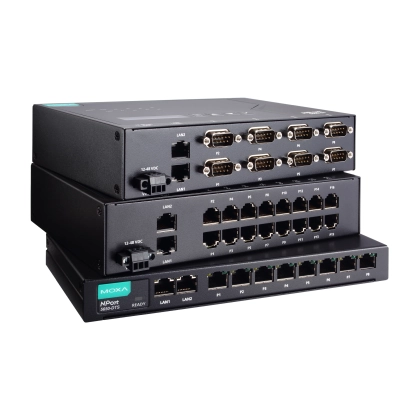
8/16-port RS-232/422/485 compact desktop serial device servers
Features
- Compact desktop design: 8-port DTS and 16-port slim models available
- One-click log collection and application analysis for easy troubleshooting
- Data encryption with secure operation modes for Real COM, TCP Server, TCP Client, Pair Connection, Terminal, and Reverse Terminal
- Secure Boot only allows Moxa-authorized firmware to run on devices
- Supports SSL certificate signing by RSA-4096 and ECC-521
- Compliance with IEC 62443-4-2 Security Level 2 requirements
The NPort 5600-8-DT-G2 device servers let you connect up to 16 serial devices to an Ethernet network quickly and transparently, bringing your existing serial equipment onto the network with minimal setup. This gives you the flexibility to manage serial devices from a central location or spread management across hosts distributed over the network. Compared to Moxa's other device server lines, the NPort 5600-8-DT-G2 uses a slimmer form factor, making it a practical option when you need extra serial ports but don't have mounting rails available. Built-in one-click log collection and a one-click application analyzer round out the series, simplifying troubleshooting when issues come up.
Secure Data Transmission
Keeping data secure is a top priority when bridging serial devices onto a network. The NPort® 5600-DT-G2 secure terminal servers address this by supporting both TLS and SSH, encrypting data before it ever leaves the device. That means your serial data stays protected whether it's traveling across a private network or the public internet.
One-Click Logs and Application Analysis for Easier Troubleshooting
During deployment, system integrators need to confirm devices are connected and communicating properly — and when something's off, having the right tools to diagnose it matters. The NPort 5600-DT-G2's built-in application analyzer generates a diagnostic report with a single click, helping integrators spot potential issues and understand how to fix them without digging through logs manually.
Once a system is in production, troubleshooting an error often means contacting the vendor's support team — and that process can be slow if support first has to gather system information before they can even begin diagnosing the problem. The one-click log collection feature solves this by packaging everything a support team needs into a single export, so they can get straight to resolving the issue.
The NPort 5600-8-DT-G2 device servers let you connect up to 16 serial devices to an Ethernet network quickly and transparently, bringing your existing serial equipment onto the network with minimal setup. This gives you the flexibility to manage serial devices from a central location or spread management across hosts distributed over the network. Compared to Moxa's other device server lines, the NPort 5600-8-DT-G2 uses a slimmer form factor, making it a practical option when you need extra serial ports but don't have mounting rails available. Built-in one-click log collection and a one-click application analyzer round out the series, simplifying troubleshooting when issues come up.
Secure Data Transmission
Keeping data secure is a top priority when bridging serial devices onto a network. The NPort® 5600-DT-G2 secure terminal servers address this by supporting both TLS and SSH, encrypting data before it ever leaves the device. That means your serial data stays protected whether it's traveling across a private network or the public internet.
One-Click Logs and Application Analysis for Easier Troubleshooting
During deployment, system integrators need to confirm devices are connected and communicating properly — and when something's off, having the right tools to diagnose it matters. The NPort 5600-DT-G2's built-in application analyzer generates a diagnostic report with a single click, helping integrators spot potential issues and understand how to fix them without digging through logs manually.
Once a system is in production, troubleshooting an error often means contacting the vendor's support team — and that process can be slow if support first has to gather system information before they can even begin diagnosing the problem. The one-click log collection feature solves this by packaging everything a support team needs into a single export, so they can get straight to resolving the issue.